
Please note that access via FTP is no longer permitted, as at March 7th, 2017 @ 12:01am EST.
The following describes how to configure SFTP access for a cPanel user.
Aside from logging into cPanel and using the File Manager tool to manage your website files, you can also connect via SFTP, not to be confused with shell access, which is prohibited.
Create your SSH Keys
You will first need to setup your SSH Keys:
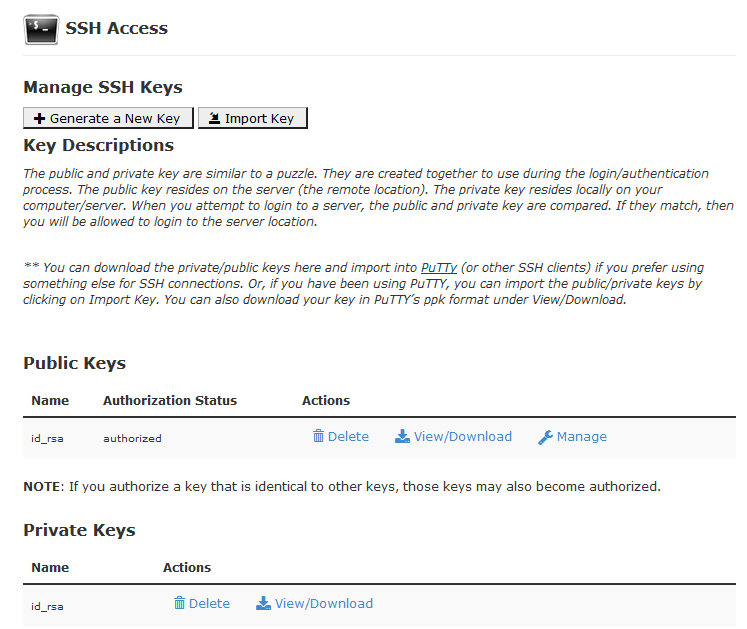
- While logged into cPanel, click on “SSH Access” under the “Security” section, then click on “Manage SSH Keys”:

- If you do not have any Private Keys setup, click on “Generate a New Key”.
- You may keep the Key Name as “id_rsa”, or change it to something more specific.
- You will be asked for a Key Password, which is optional but highly recommended. You will need this password each time you use the key.
- Key Type: RSA
- Key Size: 4096
- Click “Generate Key”.
- From the “SSH Access” page, click “Manage” beside your new key, listed under “Public Keys”:
- The “Authorization Status” should be listed as “not authorized”.
- Click “Authorize” to permit access using this key.
- From the “SSH Access” page, click “View/Download” beside your key in the list of “Private Keys”:
- Scroll down to the bottom of this page to where it says “Convert the … key to PPK format”.
- If you supplied a password during creation of this key, enter it here.
- Click “Convert”.
- Then scroll down to the bottom of the page, and click “Download” to download the “.ppk” Private Key file.
- DO NOT share your Private Key with anyone.
- Scroll down to the bottom of this page to where it says “Convert the … key to PPK format”.
Configure your Connection
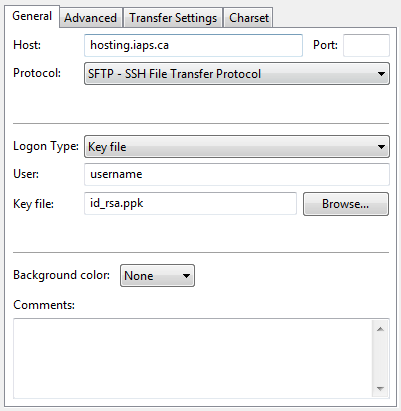
In FileZilla, setup your connection as follows:
- Host: hosting.iaps.ca
- Protocol: SFTP – SSH File Transfer Protocol
- Logon Type: Key file
- User: your cPanel username
- Key file: the “.ppk” key-file you downloaded from cPanel.
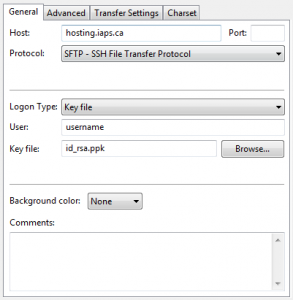
- Example:
Once you click connect, you will be prompted for the key password you set while generating the SSH Key.
That’s it! Your connection and transfers are now secure.


